Help › Categories, cost codes & vendors
Categories, cost codes & vendors
These three lists (the "masters") are what every entry is booked against: what the money was spent on, which work it was for, and who was paid. They also decide the ledgers and cost centres your vouchers use in Tally.
What each list is for
If you used the old petty cash Excel sheet, you already know these lists under other names:
| Old Excel sheet | In SiteCash | Meaning | In Tally |
|---|---|---|---|
| Sub Head | Category | What the money was spent on, e.g. Hardware and Tools, Tea & Snacks Exp. | The expense ledger |
| Super Head | Cost code | Which work or BOQ head it was for, e.g. 04 : RCC Frame Work Labour. On each site it shows with the site code: SH-04 : RCC Frame Work Labour. | The cost centre (SH-04 : RCC Frame Work Labour) |
| Main Head | Category's main head | The bigger group a category belongs to, e.g. Indirect Expenses. | The group the ledger sits under |
| Cash Paid to / Recvd from | Vendor / party | Who was paid (Shree Hardware, Om Transport…) or where the cash came from (Head Office Cash). | The vendor's ledger, or the funding account |
You find them in the menu as Categories, Cost Codes and Vendors & Parties. All three lists are shared by every site of your company.
The ready-made lists
When you sign up, SiteCash fills in lists that construction companies commonly use, taken from a real builder's Excel master sheet, so you can start at once:
- 36 cost codes, from 00 : Suspense / General, 01 : Labour Colony, Store, Office & Plant, 04 : RCC Frame Work Labour, 12 : Electrical Work with Material … up to 35 : Taxes, Statutory Charges & Office Expenses.
- 45 categories, for example Tea & Snacks Exp (default cost code 35), Naka Labour For Shuttering Work (04), Electrical Products and Labour (12), Water Tanker Exp (31). Most are of kind Expense under main head Indirect Expenses. A few, like Hardware and Tools and Transportation/Freight - Goods, have no default cost code, so the person entering picks the work each time.
- Three special categories: Paid Against Bill (kind Paid against bill), and Suspense A/c and Exp. For Other Site (kind Suspense, cost code 00).
- No vendors. The vendor list builds itself as people type names on entries and bills (see Vendors & parties).
Categories
A category says what the money was spent on. Site users choose one on every expense.
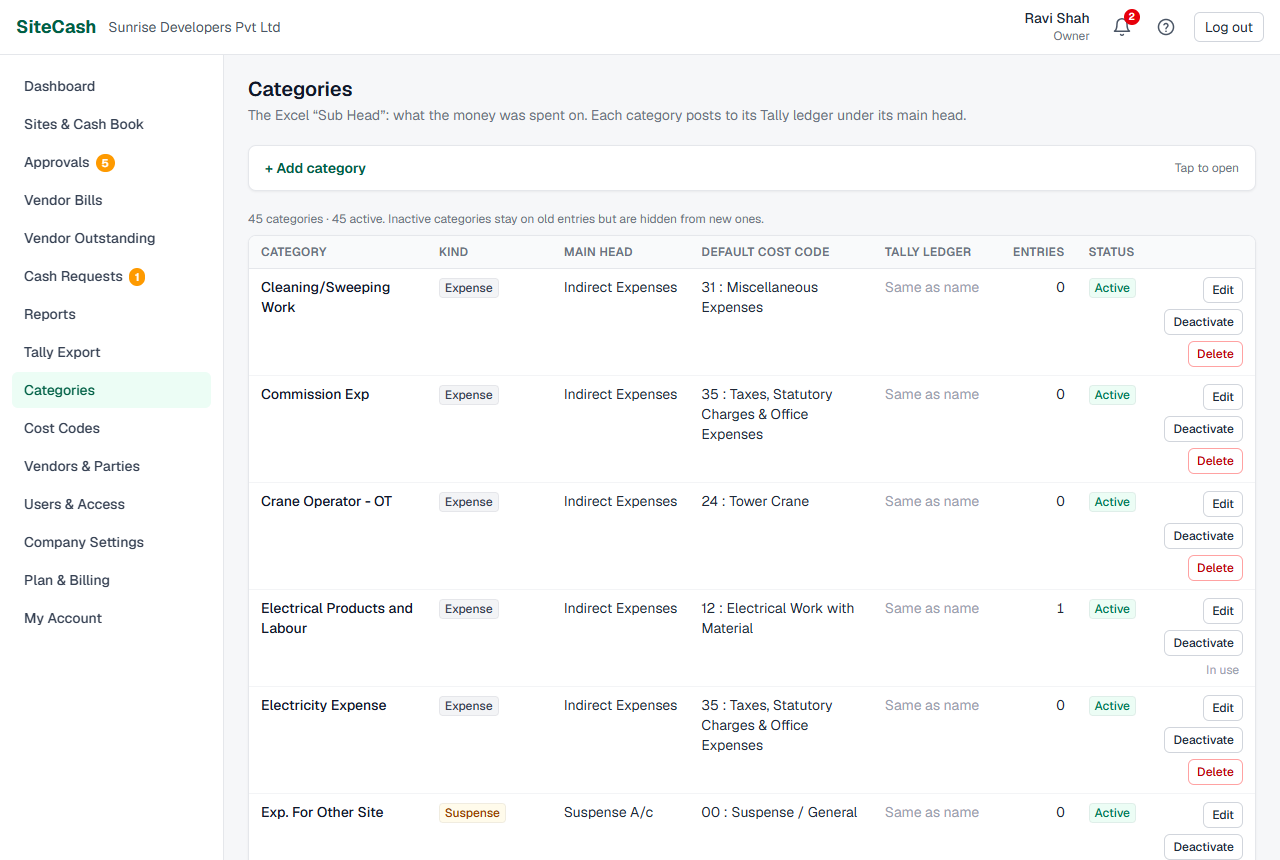
| Field | What to enter |
|---|---|
| Name | What the money was spent on, e.g. Cement or Diesel. Up to 120 characters. Must be unique. |
| Kind | Expense, Paid against bill or Suspense. See Category kinds. |
| Main head (Tally group) | The Excel "Main Head", e.g. Indirect Expenses. As you type, SiteCash suggests common Tally groups (Indirect Expenses, Direct Expenses, Purchase Accounts, Sundry Creditors, Suspense A/c, Loans & Advances (Asset), Current Assets, Fixed Assets, Duties & Taxes) and the main heads you already use. When SiteCash creates this category's ledger in Tally, it puts it under this group. |
| Default cost code | The cost code filled in automatically when someone picks this category. Choose Ask every time when it depends on the work (for example hardware can be for any work). |
| Tally ledger | The exact ledger name in Tally. Leave it blank if the Tally ledger has the same name as the category ("Same as name"). |
The list also shows Entries: how many entries use the category. A category can be deleted only when no entries and no vendor bills use it (see Deactivate or delete).
Default cost code or "Ask every time"
On the expense form, choosing a category fills in its default cost code; the person can still change it. If the category is set to Ask every time, the cost code stays empty and the form says "Pick which work this expense belongs to." For an Expense category, the entry cannot be saved without a cost code ("Choose the cost code (which work is this expense for?).").
Category kinds
The kind decides what the entry form asks for and how the entry goes to Tally.
| Kind | Use it for | On the entry form | In Tally |
|---|---|---|---|
| Expense | Normal site spending: tea, diesel, hardware, labour. | Cost code is required. "Paid to" is optional. | Debit the category's ledger with the cost centre. |
| Paid against bill | Paying a vendor's bill from site cash, e.g. ₹25,000 to Shree Hardware against their bill. | "Vendor (bill paid to)" is required. You can pick the vendor's open bill so the payment is matched to it (see Vendor bills). Cost code is optional. | Debit the vendor's ledger (not the category's), so the vendor's balance goes down. |
| Suspense | Money whose final head is not known yet, e.g. spent for another site, to be sorted out later by the accountant. | Cost code is optional. | Debit the category's ledger (e.g. Suspense A/c), to be moved later. |
Cost codes
A cost code says which work or BOQ head the money was for. Codes are shared by all sites. On each site the code is shown with the site code in front, so 04 : RCC Frame Work Labour appears as SH-04 : RCC Frame Work Labour on Sunrise Heights and GP-04 : RCC Frame Work Labour on Green Park Villas. That is also the Tally cost centre name, so each site has its own cost centres in Tally.
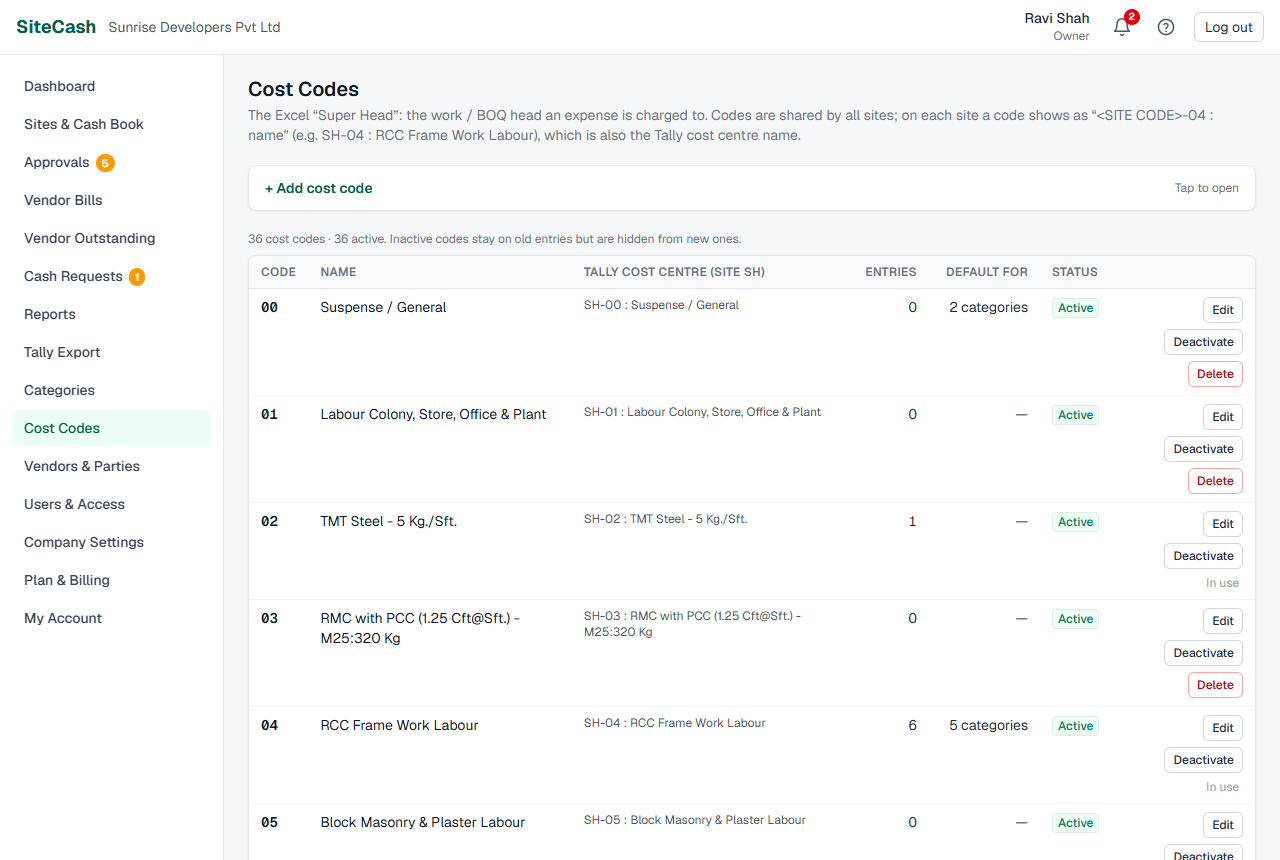
| Field | What to enter |
|---|---|
| Code | Short and unique, e.g. 04 or 12A. Up to 10 characters: letters, numbers, dot and dash. Letters are saved as capitals. |
| Name | The work / BOQ head, e.g. RCC Frame Work Labour. Up to 150 characters. |
The list shows Entries (how many entries use the code) and Default for (how many categories fill it in automatically). A cost code can be deleted only when no entries and no vendor bills use it.
Vendors & parties
This list holds everyone money is paid to or received from: vendors, labour contractors, staff, and the accounts petty cash is funded from.
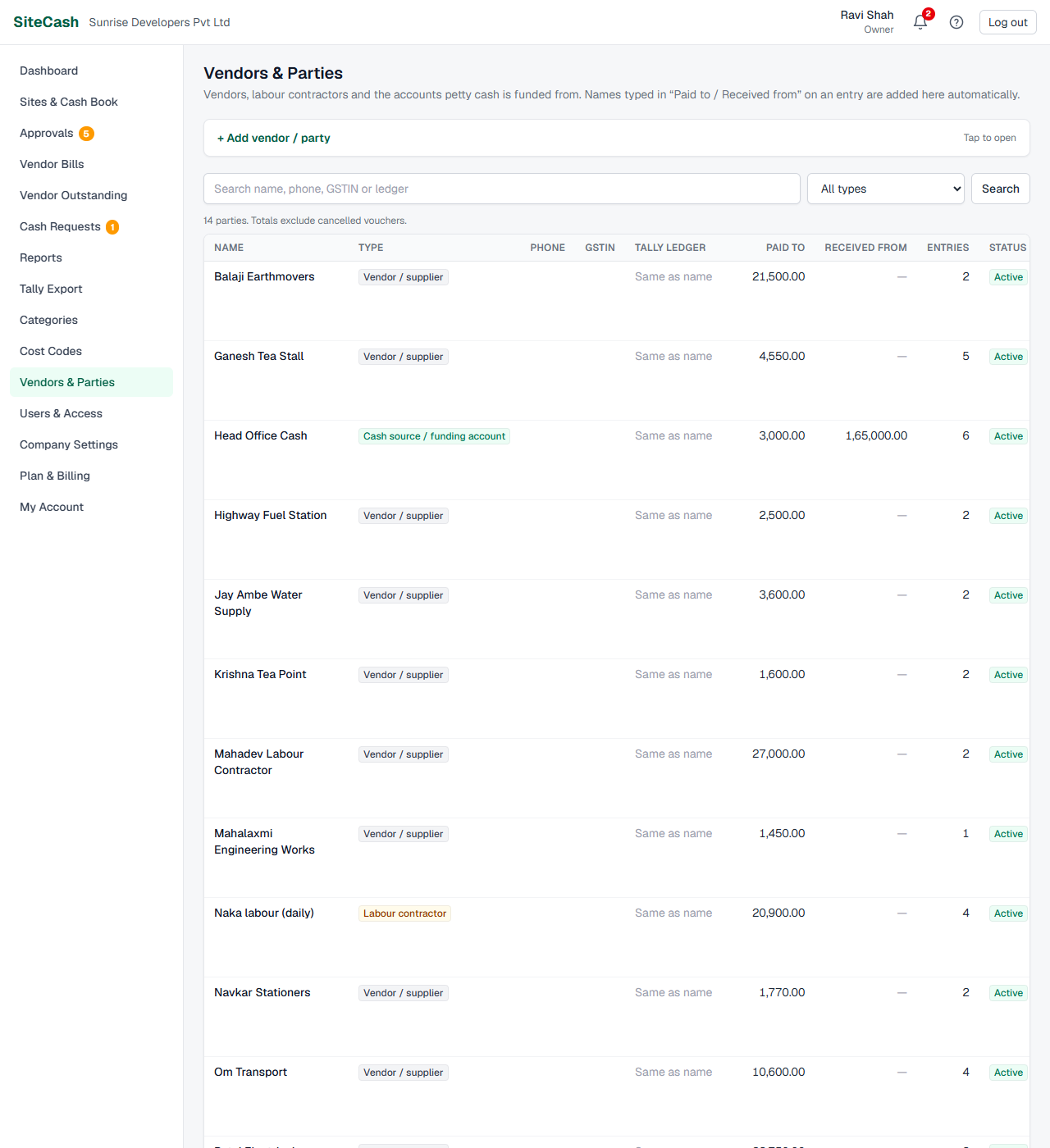
Types
| Type | Examples |
|---|---|
| Vendor / supplier | Shree Hardware, Patel Electricals, Ganesh Tea Stall |
| Labour contractor | Mahadev Labour Contractor |
| Cash source / funding account | Head Office Cash: the account or person that tops up site petty cash |
| Staff | Your own staff paid from site cash |
| Other | Anyone else, e.g. Om Transport if you prefer |
The type matters on the entry form. On an expense, the "Paid to" suggestions show every type except cash sources. On cash received and cash returned, the "Received from" suggestions show only cash sources.
Names are added automatically
You do not have to add every vendor first. When someone types a new name in "Paid to" on an expense, or on a vendor bill, SiteCash adds it as a Vendor / supplier. A new name in "Received from" on cash received or cash returned is added as a Cash source / funding account. Names are matched without caring about capitals, so "shree hardware" is the same party as "Shree Hardware". Afterwards, change the type if needed, e.g. set Mahadev Labour Contractor to Labour contractor.
Fields
| Field | What to enter |
|---|---|
| Name | As it should appear on vouchers, e.g. Shree Hardware. Up to 150 characters. Must be unique. |
| Type | See the table above. Use Cash source for the account or person that tops up the petty cash. |
| Phone | Optional, e.g. 98250 12345. |
| GSTIN | Optional. 15 characters, e.g. 24ABCDE1234F1Z5. |
| Tally ledger | The exact ledger name in Tally. Leave blank to use the party name. |
Search, filter and totals
- Type in Search name, phone, GSTIN or ledger and/or choose a type (or All types), then click Search.
- Click Clear to see everyone again.
For each party the list shows Paid to (expenses and cash returned to them) and Received from (cash received from them) in ₹, and a Total row for all parties that match. These totals come from petty cash entries only and leave out cancelled vouchers. The list shows at most the first 500 parties; search to find others. For bills, payments and what you still owe a vendor, use Vendor Outstanding.
Adding and editing
All three lists work the same way.
- Click the + Add category (or + Add cost code, + Add vendor / party) bar at the top to open the form.
- Fill in the fields and click Add category (Add cost code, Add party). A green message confirms it and the form is cleared for the next one.
- To change one, click Edit on its row. The form opens at the top with the current values. Click Save changes, or Cancel.
Deactivate or delete
Each row has Deactivate (or Activate) and, when it is not used, Delete.
| Deactivate | Delete | |
|---|---|---|
| When | Any time. Use it for things you no longer use. | Only when no entries and no vendor bills use it. Otherwise the row shows In use instead of the Delete button (even when Entries is 0, if a vendor bill uses it). |
| What happens | Hidden from new entries. Old entries, reports and exports keep it. Status shows Inactive; click Activate to bring it back. | Removed for good after you confirm ("… This cannot be undone."). |
Who can change the lists
- Owner, Admin and Accountant see Categories, Cost Codes and Vendors & Parties in the menu and can add, edit, deactivate and delete.
- Site users do not see these pages. They choose from the active categories and cost codes on the entry form, and a new name they type in "Paid to" or "Received from" is added to the vendor list automatically.
See Users, access & settings for roles.
Troubleshooting
| If you see… | It means… | Do this |
|---|---|---|
| "That category is used in entries or vendor bills, so it cannot be deleted. Deactivate it instead to hide it from new entries." (the same for cost codes and parties: "That cost code is used in entries or vendor bills, …", "That party is used in entries or vendor bills, …") | Some entry or vendor bill still uses it. | Click Deactivate instead. |
| "… already exists." | A row with that name or code is already in the list, maybe with different capitals or inactive. | Search for it and edit or activate that one. |
| "The code can only use letters, numbers, dot and dash, e.g. 04 or 12A." | The cost code has spaces or other signs. | Use a short code like 04, and put the words in Name. |
| A category or cost code is missing on the entry form | It is inactive. | Activate it in the list. |
| A vendor is missing in "Received from" suggestions (or a funding account in "Paid to") | The suggestions are filtered by type. | Edit the party and set the right type. |
| The same vendor appears twice with slightly different spelling ("Om Transports", "Om Transport") | People typed the name differently. | Deactivate the one you don't want (or delete it if no entries or vendor bills use it), and ask sites to pick from the suggestions. |
| Tally says a ledger does not exist, or a ledger was not created | The Tally ledger name or main head does not match your Tally. | Fix Tally ledger or Main head (Tally group). See Tally troubleshooting. |
| Saving shows the view-only message, or Deactivate / Delete takes you to Plan & Billing | Your company is in view-only mode (trial or plan ended, renewal overdue, or suspended). | Ask the owner or an admin to choose a plan. See View-only mode. |
| You cannot open these pages | You are a site user. | Ask the owner, an admin or the accountant (for example Neha Joshi) to make the change. |