Help › Plan & billing
Plan & billing
SiteCash is paid per company, not per person. Every new company starts with a free trial. After that you choose a plan and pay monthly or yearly online. This page explains the plans, how to pay, and what happens when a trial or plan ends.
Who can see and who can pay
Everyone in your company can open Plan & Billing in the menu and see the plan, how much of it is used and the payments made.
Only an owner or an admin can choose a plan, pay, or cancel. Accountants and site users see "Only the company owner or an admin can change the plan." and the plan buttons are greyed out.
The free trial
When you sign up, your company gets a 14-day free trial of the Growth plan. No card is needed. During the trial you can use everything in Growth: up to 5 sites, up to 15 users, the Tally connector and WhatsApp alerts.
- The top bar shows Trial · 9 days left on a computer. Click it to open Plan & Billing.
- In the last 3 days, a yellow message at the top of every page says, for example, "Your free trial ends in 3 days (30 Sep 2026). Choose a plan to keep going."
- You can choose a plan at any time during the trial. The paid period starts on the day you pay; any trial days left over are not added on.
At the end of the trial, if no plan has been chosen, your company becomes view-only: "Your free trial ended on 30 Sep 2026. Choose a plan to continue adding entries — everything you entered is safe and can still be viewed and exported." Nothing is deleted. As soon as you pay, you can add entries again.
Plans and prices
There are three plans. They differ in how many active sites and users you can have, and in three extra features. The prices below are the standard prices at the time of writing; the Plan & Billing page always shows the current prices.
| Starter | Growth | Business | |
|---|---|---|---|
| Monthly price (before GST) | ₹999 | ₹2,499 | ₹5,999 |
| Yearly price (before GST) | ₹9,990 | ₹24,990 | ₹59,990 |
| You pay monthly (with 18% GST) | ₹1,179 | ₹2,949 | ₹7,079 |
| You pay yearly (with 18% GST) | ₹11,788 | ₹29,488 | ₹70,788 |
| Active sites | 1 site | Up to 5 sites | Unlimited sites |
| Users | Up to 3 users | Up to 15 users | Unlimited users |
| Vendor bills & outstanding | Yes | Yes | Yes |
| Tally connector (automatic import) | No | Yes | Yes |
| WhatsApp alerts | No | Yes | Yes |
Every plan includes: site cash book with bill photos, approvals and printed vouchers, cash requests and email alerts, reports, Excel and Tally export (XML files).
You can also see the plans on the SiteCash home page before you sign up.
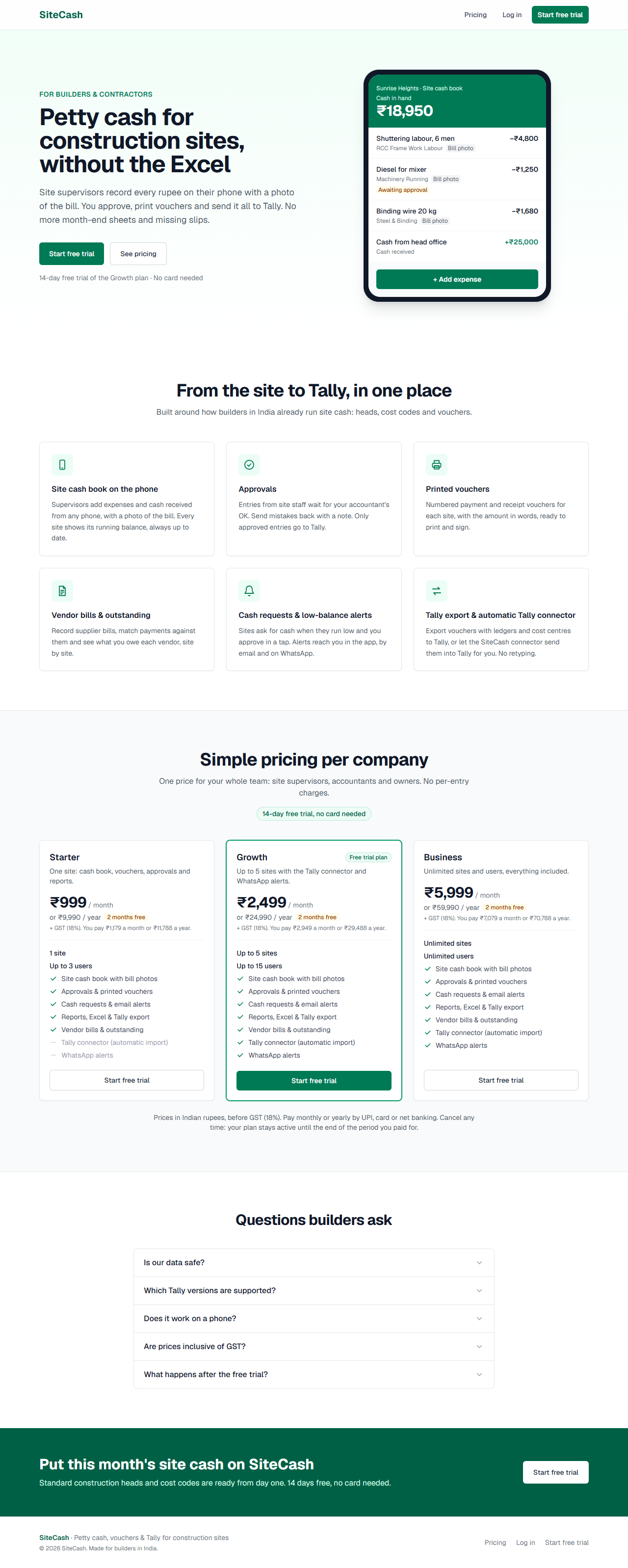
Users means everyone with a login in your company: owners, admins, accountants and site users. Active sites means sites that are open; closed sites do not count (see Sites & cash book).
The Plan & Billing page
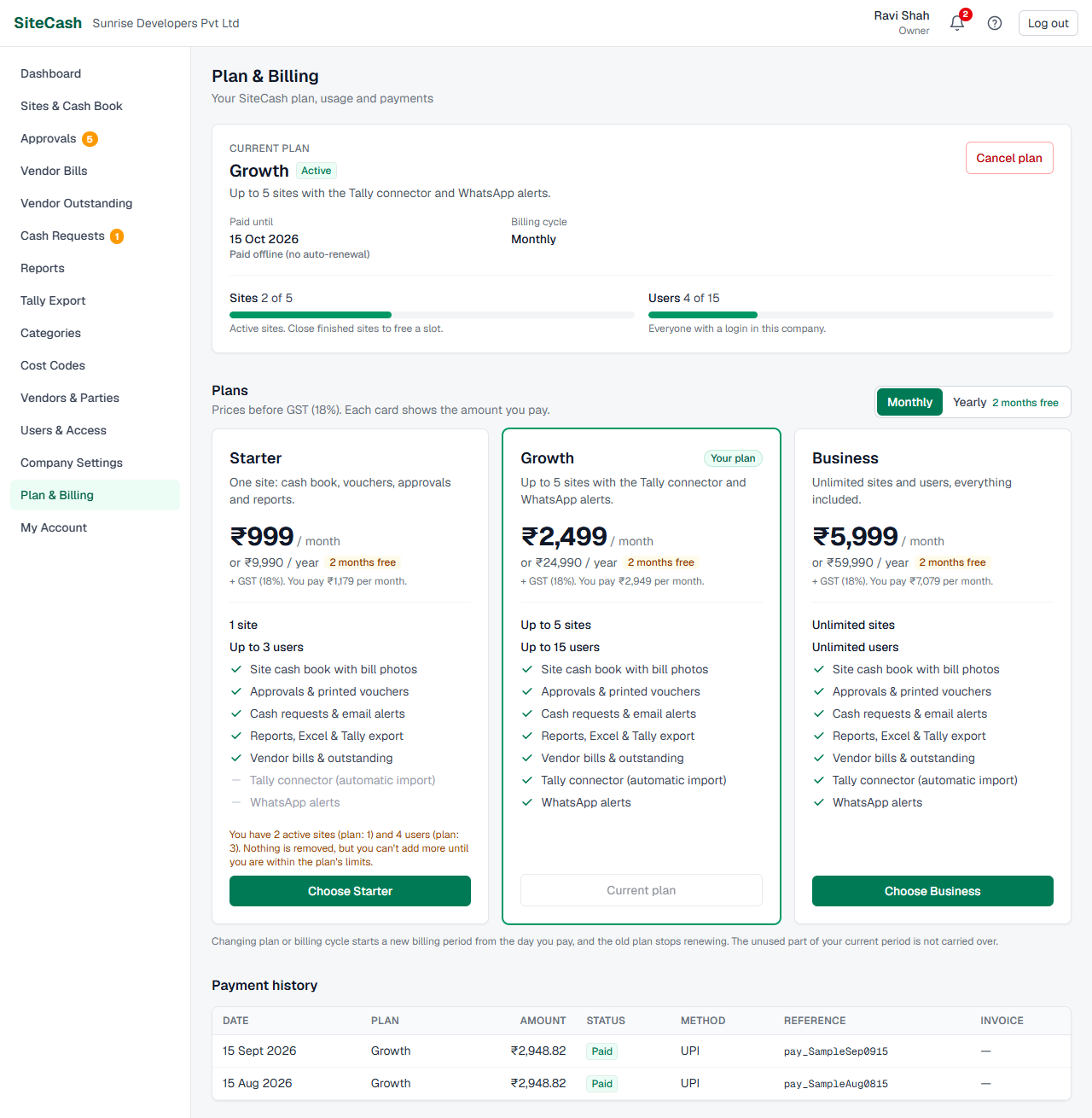
Current plan card
- Plan name and status, for example "Growth" with Free trial. See Plan statuses.
- Free trial (during a trial): days left and end date, for example "9 days left (ends 06 Oct 2026)", or "Ended on …".
- Paid until (on a paid plan): the last day of the period you paid for, with one of: "Renews automatically", "Will not renew" (cancelled) or "Paid offline (no auto-renewal)".
- Billing cycle: Monthly, Yearly, or "Not chosen yet" during the trial.
- A yellow or red message when something needs your attention.
- The Cancel plan button (owners and admins, on an active paid plan).
Usage bars
Two bars show Sites ("2 of 5", active sites) and Users ("3 of 15", everyone with a login). On Business they show "of unlimited". When you reach the limit, the bar turns amber with "Limit reached"; above the limit (for example after moving to a smaller plan) it turns red with "Over the limit".
Plan cards
Below, the Plans section shows one card per plan. Use the Monthly / Yearly switch at the top right to see the prices for each cycle (the Yearly button shows "2 months free"). Your current plan is outlined in green and marked "On trial", "Trial ended" or "Your plan".
The button on each card says what it will do:
| Button | Meaning |
|---|---|
| Choose Growth | Buy this plan. |
| Current plan | Greyed out: you are already paying for this plan and cycle. |
| Switch to yearly / Switch to monthly | Same plan, other billing cycle. |
| Renew Growth | Pay again for your plan after it was cancelled, expired or a renewal failed. |
If a card's plan is smaller than what you use today, it says so, for example "You have 3 active sites (plan: 1). Nothing is removed, but you can't add more until you are within the plan's limits."
Plan statuses
| Status | What it means | Can you add entries? |
|---|---|---|
| Free trial | Your 14-day trial is running. | Yes |
| Active | You have paid and the plan is running. | Yes |
| Payment due | An automatic renewal payment failed. You have 7 days after the paid date to pay. | Yes, during the 7 days; then no (the badge turns red) |
| Cancelled | You cancelled. The plan works until the paid date and will not renew. | Yes, until the paid date; then no (the badge turns red) |
| Expired | The trial or paid period has ended, or renewals stopped. | No: view-only |
| Suspended | SiteCash support has paused your account. The message shows the reason, if one was given. | No: view-only until SiteCash support reactivates it |
Choose a plan and pay
Payments are handled by Razorpay, a payment company. SiteCash never sees your card or bank details.
- Open Plan & Billing (owner or admin).
- Pick Monthly or Yearly at the top of the Plans section.
- Check the usage bars and the plan's sites and users, then click Choose Growth (or the plan you want). The button shows "Starting payment…".
- The Razorpay payment window opens with "SiteCash" and the plan, for example "Growth (monthly)". Pay by UPI, card or net banking, as the window offers. The button shows "Waiting for payment…".
- After paying, SiteCash shows "Payment done. Confirming it with Razorpay…" and then "Payment received — your Growth plan is active."
The plan renews automatically at the end of each month or year, using the payment method you approved in Razorpay, until you cancel. Razorpay may also email you about the payment.
Change your plan
To move to a bigger or smaller plan, or from monthly to yearly, click that plan's button (Choose Business, Switch to yearly and so on) and pay as above.
- The new plan starts a new billing period from the day you pay.
- The old plan stops renewing, so you are not charged twice.
- The unused part of your current period is not carried over or refunded. To lose nothing, change plan close to your paid date.
Moving to a smaller plan never deletes sites, users or entries. If you have more than the new plan allows, you simply cannot add more until you are within the limit. On Starter, the Tally connector stops sending exports to Tally: the Tally Export page shows a warning, the connector shows as Offline, and new exports are not queued for it. You can still download the XML files and import them by hand (see Tally export & connector). WhatsApp alerts stop too; in-app and email alerts continue.
Cancel your plan
- Open Plan & Billing (owner or admin).
- On the current plan card, click Cancel plan.
- Read the question: the plan stays active until the end of the period you have paid for and will not renew; after it ends, SiteCash becomes view-only until you choose a plan again. Confirm.
- You see, for example, "Your Growth plan is cancelled. It stays active until 27 Oct 2026 and will not renew."
Until that date everything works as before, and the status shows Cancelled. After it, your company becomes view-only. You can come back any time with Renew Growth or another plan.
When a renewal payment fails
If the automatic renewal fails (card expired, UPI mandate cancelled, not enough balance), the status becomes Payment due and every page shows: "The renewal payment for your Growth plan failed. Please pay by 03 Nov 2026 to avoid interruption."
- You keep working normally for 7 days after the paid date.
- Razorpay may try the payment again by itself. You can also pay now with Renew Growth on the plan card; this starts a fresh period from the day you pay.
- If nothing is paid in time, your company becomes view-only: "Your subscription payment is overdue. Renew your plan to continue adding entries."
View-only mode
When the trial or plan has ended, a renewal is overdue, or the account is suspended, SiteCash shows a red bar at the top of every page: View-only mode. with the reason and a link, Choose a plan for owners and admins or See plan for others.
| Still works | Paused until you pay |
|---|---|
|
Opening every page: cash books, balances, entries and bill photos, cash requests, vendor bills Printing vouchers Reports and Excel downloads Downloading earlier Tally XML files Plan & Billing: choosing a plan and paying My Account (your own password and alert settings) and the Alerts page Revoking a Tally connector, and cancelling a send to Tally that is still waiting Removing a user from the company |
Saving, editing or cancelling entries; adding or deleting bill photos Approving entries or sending them back New cash requests; approving, rejecting or cancelling requests Vendor bills: saving, cancelling, matching payments, recording or removing office payments, bill photos Categories, cost codes and vendors: adding, editing, deactivating or deleting Company Settings and site settings (including reopening a closed site) Adding sites and users; changing a user's role or site access; resetting someone's password Import from Excel Generating new Tally exports and undoing an export Adding a Tally connector; Send to Tally and Retry |
Every change to your company's data waits until a plan is active. If you click a button that is paused, it either shows the view-only reason (for example "Your free trial ended on 30 Sep 2026. Choose a plan to continue adding entries — …") or takes you to this Plan & Billing page.
Your data is safe. Nothing is deleted while the account is view-only, and everything starts working again the moment the payment is confirmed.
Plan limit messages
| You see | It means | Do this |
|---|---|---|
| "Your Starter plan includes 1 active site. Upgrade your plan (Billing) or close a finished site to add another." | You have as many open sites as the plan allows. Reopening a closed site also counts. | Close a finished site, or choose a bigger plan. |
| "Your Starter plan includes 3 users. Upgrade your plan (Billing) to add more." | You have as many users as the plan allows. | Remove someone who has left (how), or choose a bigger plan. |
| "The Tally connector is not included in the Starter plan. Upgrade on the Billing page." (on Add connector) | Automatic import into Tally is part of Growth and Business. | Use XML files, or choose Growth or Business. |
| "The Tally connector is not included in the Starter plan. Download the vouchers XML and import it in Tally, or upgrade on the Plan & Billing page." (on Send to Tally or Retry) | Your plan does not include the connector, so exports cannot be sent to Tally automatically. | Download the vouchers XML from the export and import it in Tally, or choose Growth or Business. |
Paying by bank transfer
If you prefer to pay by bank transfer, NEFT, cheque or UPI outside Razorpay, contact SiteCash support. After they receive the money, they activate your plan for the period you paid for.
- The current plan card then shows Paid until with "Paid offline (no auto-renewal)".
- The payment appears in Payment history as Paid offline with method "Offline".
- It does not renew by itself. Contact SiteCash support before the paid date to pay for the next period. (For the same plan and cycle, the online button shows Current plan until the paid period is over; after that it shows Renew ….)
If online payment is not switched on for SiteCash yet, the Plans section says "Online payment is not enabled yet. To activate a plan, contact SiteCash support (bank transfer / UPI)."
Payment history
At the bottom of Plan & Billing, Payment history lists your last payments, newest first. Before the first payment it says "No payments yet".
| Column | What it shows |
|---|---|
| Date | When the payment was made. |
| Plan | The plan it paid for. |
| Amount | Amount paid, including GST, for example ₹2,949.00. |
| Status | Paid, Paid offline or Failed. |
| Method | UPI, Card, Net banking, e-Mandate, NACH, Wallet or Offline. |
| Reference | Razorpay's payment number (starts with "pay_"), or the note for an offline payment. Quote it when you contact support. |
| Invoice | A View link when an invoice is available. |
Troubleshooting
- The plan buttons are greyed out and it says "Only the company owner or an admin can change the plan." Ask your owner or an admin to pay.
- "Could not open the Razorpay payment window. Check your internet connection and try again." The payment window could not load. Check the internet, turn off pop-up or ad blockers for SiteCash, and try again.
- "You are already on the Growth plan." You are already paying for that plan and cycle. Nothing more to do.
- Money was deducted but the plan is not active. Wait 5–10 minutes and reload. If it is still not active, contact SiteCash support with the Razorpay payment number from your bank or Razorpay email.
- "This account is suspended. Please contact SiteCash support to reactivate it." Only SiteCash support can lift a suspension.
- Site users say they cannot save entries, or buttons take you to Plan & Billing. Look for the red "View-only mode" bar. Pay for a plan and everyone can continue at once.
- The usage bar says "Over the limit". You moved to a smaller plan. Nothing is lost; close sites or remove users to get within the limit, or choose a bigger plan.